CUSTOMER SUPPORT AGENTS
An example of support automation grounded in real knowledge, with a human escape hatch.
An AI-powered support system that understands customer requests, retrieves relevant information, performs connected actions, and escalates issues when needed.
Process snapshot
Illustrative view of how this system is structured — workflow characteristics, not measured client results.
- Architecture views
- 02
- AI support system
- Multi-tool
- Tool integration
- Knowledge +
Architecture views
AI support system
Tool integration
Automation coverage by stage
- 01
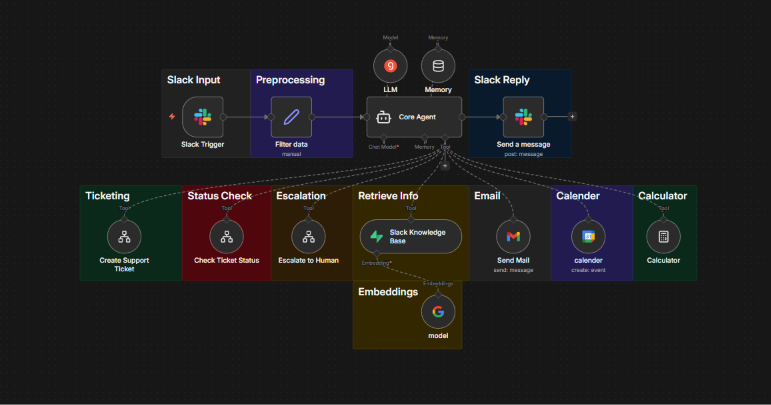
A Slack trigger receives the customer request
- 02
Preprocessing filters and shapes the incoming data
- 03
The core agent, with model and memory attached, interprets the request
- 04
It calls the appropriate tool: ticketing, status check, escalation, knowledge base, email, calendar or calculator
Bars indicate how far each stage runs without manual input — illustrative, not measured.
Overview
Requests arrive from Slack, are preprocessed and passed to a core AI agent that decides which tool the request needs — ticketing, status checks, escalation, knowledge retrieval, email, calendar or calculation.
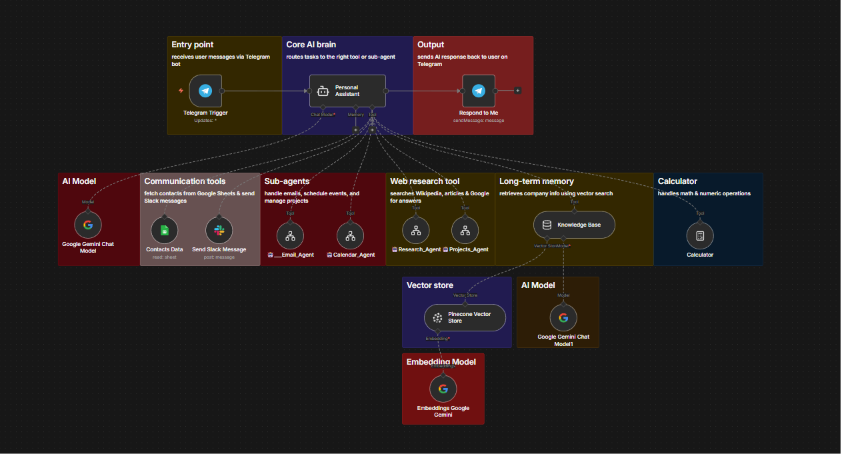
A broader agent architecture sits behind it: sub-agents, web research, long-term memory in a vector store and embeddings, so answers can be grounded in real knowledge rather than guessed.
The challenge
Support teams answer the same questions repeatedly and still have to look up order status, open tickets and dig through internal documents for each one.
The solution
A tool-connected agent that interprets each request, retrieves grounded knowledge, performs the action itself, and escalates to a human when the request needs one.
How it works
- 01A Slack trigger receives the customer request
- 02Preprocessing filters and shapes the incoming data
- 03The core agent, with model and memory attached, interprets the request
- 04It calls the appropriate tool: ticketing, status check, escalation, knowledge base, email, calendar or calculator
- 05Knowledge retrieval uses embeddings and a vector store for grounded answers
- 06The response is sent back into Slack, or escalated to a human
Automation & architecture
Agent architecture — sub-agents, web research, memory, vector store and embeddings. Each component is wired so data passes forward in a predictable shape, with the AI layer making the decisions and the automation layer carrying out the actions.
- Slack input and responses
- Data preprocessing
- Core AI agent routing
- Ticket creation and status checking
- Human escalation
What it automates
- Reading and preprocessing incoming Slack requests
- Interpreting intent and routing to the right tool
- Creating tickets and checking their status
- Retrieving grounded answers from a knowledge base
- Email, calendar and calculation actions
- Escalating to a human when required
My role
Designed and built the AI support workflow, including agent logic, tool integration, and automated customer interactions.
Benefits
- Handles common customer questions
- Retrieves relevant information before answering
- Automates routine support actions
- Creates and manages support tickets
- Connects with communication and productivity tools
- Performs certain actions directly through tools
- Escalates issues to humans when necessary
- Uses knowledge retrieval to improve responses
Have a process worth automating?
These are examples of systems I've designed — the approach adapts to most business workflows.